
LinkedIn is not just a place to post, connect, and hope someone notices. It is a professional database, visibility engine, networking platform, and content distribution tool.
If you are using LinkedIn for a job search, business development, nonprofit visibility, speaking opportunities, recruiting, or thought leadership, your analytics tell you whether your activity is working.
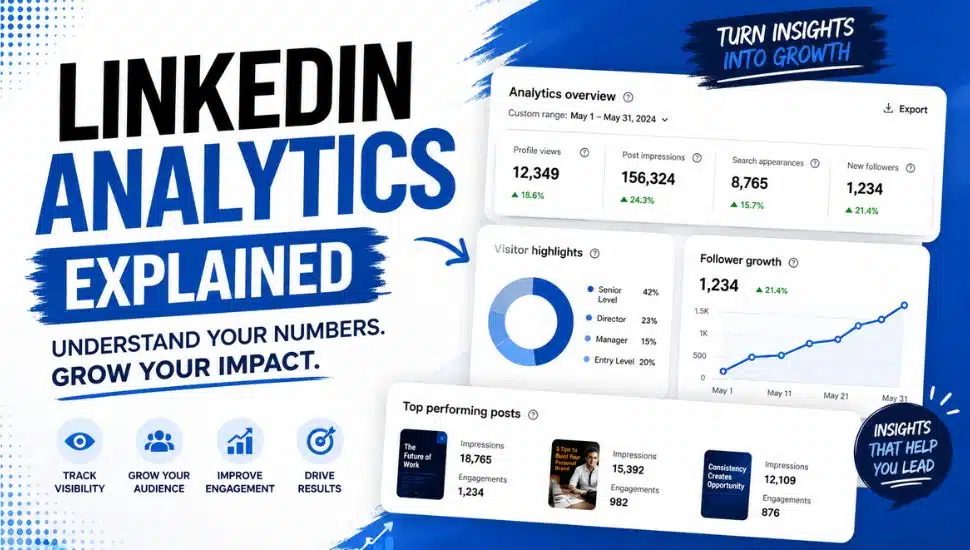
LinkedIn analytics show impressions, members reached, profile viewers, search appearances, follower growth, article views, newsletter subscribers, audience demographics, and visibility sources, including posts, comments, search, and recommendations.
LinkedIn’s own help pages confirm that members can access post analytics, audience demographics, profile insights, and newsletter analytics, although exact views may vary by account type, creator activity, and whether you publish newsletters.
Why LinkedIn Analytics Matters
Too many people post on LinkedIn and then judge success by likes alone.
That is a mistake.
Likes are only one small signal. A post may receive modest reactions but still reach hundreds or thousands of people. A profile may attract recruiters through search even when you are not actively posting. A newsletter may gain subscribers even when article comments are quiet.
- Analytics help you answer better questions:
- Are the right people finding me?
- Which posts are creating visibility?
- Are my keywords working?
- Is my audience growing?
- Are profile viewers aligned with my goals?
- Are newsletter subscribers increasing?
- Are my comments helping me appear in more places?
In other words, LinkedIn analytics help you move from random activity to strategic visibility.
Where to Find LinkedIn Analytics on Your Personal Profile
Start here. Go to your LinkedIn profile and scroll to the Analytics section. Look for key numbers including profile views, post impressions, and search appearances, then click each one to see more details.
This area lets you review analytics for posts, newsletters, profile viewers, and search appearances, as available.
Analytics display differently on desktop, mobile, newsletters, Premium, or company pages. Also, review their knowledge base article and related articles.
1. Post Impressions
What it means: Post impressions show how many times your post appeared on someone’s screen.
This does not mean someone read every word. It means your content was displayed.
To check post impressions, go to your LinkedIn profile and scroll to the Activity section. Click “Show all activity,” then select Posts. Open any post and click “View analytics” or the analytics number displayed beneath it.
Post analytics are available for text posts, images, videos, polls, events, and articles. These help you evaluate reach, trends, and audience demographics.
2. Members Reached
What it means: Members reached shows how many unique LinkedIn members saw your post.
This is different from impressions. One person may create multiple impressions if they see your post more than once.
Why it matters: Members reached can give you a clearer sense of audience size. If impressions are high, but the number of people reached is lower, some people may be seeing your content repeatedly.
3. Profile Viewers
What it means: Profile viewers show who has visited your LinkedIn profile.
How to check profile viewers:
- Go to your LinkedIn profile.
- Find the Analytics section.
- Click Profile views.
- Review available viewer information.
A free account lets you see limited information. Premium reveals more viewer details. Either way, focus on the key question: not only “How many people viewed me?” but also “Are the right people viewing me?”
Look for patterns:
- Recruiters
- Hiring managers
- Business owners
- Potential clients
- Industry peers
- Nonprofit leaders
- Speakers
- Media contacts
- Alumni
- Local professionals
4. Search Appearances
What it means: Search appearances show how often your profile appeared in LinkedIn search results.
Job seekers, consultants, coaches, speakers, entrepreneurs, and nonprofit leaders should prioritize this number.
To check search appearances, go to your LinkedIn profile and scroll to the Analytics section. Click “Search appearances” to review available data, including who searched for you and which keywords are associated with your profile.
If your search appearances are weak, strengthen your LinkedIn profile by adding relevant keywords to your headline, About section, Experience section, Skills, Services, or Featured content.
Remember: LinkedIn is a database. Use keywords strategically.
5. Followers
What it means: Followers are people who choose to see more of your content.
Connections are part of your network. Followers may include people outside your direct connections.
To check your followers, go to your profile and look beneath your headline for your follower count. Additional follower details may also be available under Analytics or Audience Analytics.
Follower growth goes beyond vanity metrics. When the right audience follows you, growth signals stronger visibility and credibility.
6. Newsletter Subscribers
If you publish a LinkedIn newsletter, subscriber count matters because LinkedIn notifies subscribers when you publish new editions.
To check newsletter subscribers, go to your LinkedIn profile and navigate to your newsletter page. From there, look for newsletter analytics or subscriber information to review available metrics including total subscribers, new subscribers, impressions, and article views.
Newsletter analytics include new subscribers, impressions, and article views, which count clicks to view editions on LinkedIn or in emails during your selected date range.
Article views measure when a member clicks to view a newsletter edition on LinkedIn or within a newsletter email during the selected date range.
7. Article Views
What it means: Article views show how many people clicked into and viewed your LinkedIn article or newsletter edition.
This matters because article views show deeper interest than a simple scroll-by impression.
To check article views, go to your profile and click Activity, then select Articles or your newsletter. Open the article and click the available analytics to review performance data.
If you see high article impressions but low views, review your title, opening image, topic, or first few lines for greater appeal.
8. Overview Analytics
Your analytics overview gives you a snapshot of your activity and visibility.
Look for:
- Post impressions
- Profile viewers
- Search appearances
- Follower growth
- Engagement trends
- Audience demographics
- Newsletter growth
- Article views
Use this area weekly to spot patterns. Do not panic over one weak post. Look for trends over time.
9. Content Analytics
Content analytics help you understand what your audience responds to.
Review:
- Which posts received the most impressions
- Which posts reached the most members
- Which posts generated comments
- Which posts attracted profile views
- Which topics created saves or shares, if available
- Which formats performed best: text, image, document, video, poll, article, or newsletter
For LinkedIn Pages, LinkedIn says content analytics help admins evaluate engagement trends among followers.
Even on a personal profile, the lesson is the same: your audience is giving you data. Read it.
10. Audience Analytics
Audience analytics help you understand who is seeing your content.
Look for:
- Job titles
- Industries
- Locations
- Companies
- Seniority levels
- Follower demographics
- Connection patterns
This is where strategy becomes important.
If you are a job seeker targeting project manager roles but your audience is mostly unrelated, your content and keywords may need adjustment.
If you are a business owner attracting peers but not buyers, your messaging may be too colleague-focused.
If you are a nonprofit leader attracting volunteers, donors, sponsors, and speakers, your content may be doing its job.
11. Weekly Progress: What to Track
Create a simple weekly tracking system.
Track these numbers every week:
- Profile viewers
- Search appearances
- Post impressions
- Members reached
- Followers
- Newsletter subscribers
- Article views
- Top-performing post
- Top-performing topic
- Best audience category
- Number of comments you made
- Number of meaningful conversations started
The goal is not perfection. The goal is pattern recognition.
12. Where You Appeared
LinkedIn visibility does not come only from your own posts.
You may appear through:
- Posts
- Comments
- Search results
- Network recommendations
- Profile recommendations
- Newsletter notifications
- Article shares
- Reposts
- Mentions
- Company page activity
- Event activity
- Group activity
This is why commenting matters. A thoughtful comment can create visibility with someone else’s audience. In some cases, a comment may generate more profile views than your own post.
What to Do With the Data
Analytics are only useful if they change your behavior.
If profile views are low: improve your headline, photo, banner, About section, and activity.
If search appearances are low, add stronger keywords throughout your profile.
If post impressions are low: test better hooks, stronger topics, and more consistent posting.
If the number of members reached is high, but engagement is low, ask better questions or make your content more useful.
If followers are growing but leads are not: clarify your call to action.
If newsletter subscribers are increasing, publish consistently.
If article views are low, strengthen your title and opening paragraph.
Final Thought
LinkedIn success is not about posting and praying.
It is about showing up, measuring what happens, and adjusting with intention.
Your LinkedIn analytics are not just numbers. They are clues. They tell you whether your keywords are working, whether your content is reaching the right audience, whether your profile is attracting attention, and whether your professional brand is gaining traction.
Check your numbers weekly.
Study the patterns.
Adjust your strategy.
Because on LinkedIn, visibility is not accidental. It is measurable.
Did you read last week’s article? Networking is not dead. It has evolved and includes LinkedIn.
NEXT STEPS FOR GREAT CAREERS NETWORK
- If you have a high school or college student, have you explored the summer 2026 Career Readiness Camp for Teens?
- Subscribe to Lynne’s newsletter on LinkedIn™ for career-boosting insights.
- Subscribe to the Great Careers Network Substack
- Ready for a career move or want to build your personal brand? Book a call today for expert help on your resume or LinkedIn™ profile!
- Need corporate LinkedIn or career training? Want to volunteer, or join our Board? Book a call or email.
- Join as a member at https://greatcareers.org/membership
- Sponsor the 501(c)3 nonprofit on the website or for specific events, or match donations through Benevity.
- Make a tax-deductible contribution on Givebutter or through PayPal Giving Fund to support job seekers who have been downsized.
UPCOMING EVENTS
Join the Great Careers Network for monthly events listed on the Events Quick List Page.
- Tue May 26 | 6:30-7:30 PM | Business Executives Networking Group & ChemPharma
- Wed May 27 | 7-8:30 PM | Job Search is a Puzzle: Do You Have All the Pieces
- Thu May 28 | 9:30-10:30 AM | Career Success Group Job Seeker Accountability & Networking (Hybrid Paoli, PA)
- Sat May 30 | 10 AM-2:30 PM | Career Readiness Camp for Teens (and June 6 & 13 – Paoli, PA)
- Sun May 31 | 3-4:30 PM | Primp My Profile: LinkedIn Profile Reviews